
Get Real, Manually Digitized DST Files — No Auto-Converters
★★★★★ Trusted by embroidery professionals worldwide
JPG to DST – Premium Manual Embroidery Digitizing
1
Upload
Upload your image (JPG, PNG, PDF, or any image file formats)
2
We Review & Digitize Your File
Our expert digitizers manually convert your image into a clean DST embroidery file and confirm details before finalizing.
3
Get Your Files Ready!
Get your ready-to-stitch file by email withing 24 hours turnadound with guaranteed quality and unlimited free revisions.




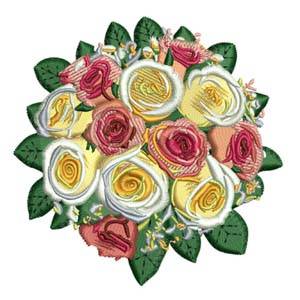
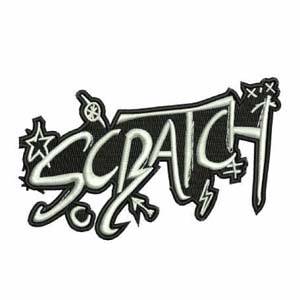



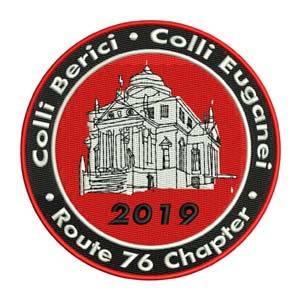








JPG to DST Conversion Pricing
$10
🧵 Basic / Standard
- All basic and standard files
- 1-day delivery
- High-quality design output
- Free minor revision
- Includes a PDF design preview
Perfect for simple logos, text, and small embroidery designs.
$15
🎨 Medium Complexity
- Medium complex designs
- 1-day delivery
- Professional digitizing by experts
- Free minor revision
- Includes a PDF design preview
Best for detailed designs with multiple colors or layered elements.
$20+
🏆 Complex / Large Design
- Highly complex and detailed files
- Fast delivery & priority handling
- 100% manual digitizing for accuracy
- Free minor revision
- Includes a PDF design preview
For large, highly detailed artworks or complex stitch structures.
Why Choose JPG to DST
✅ Expert Digitizers
We have a team of professionals and expert embroidery digitizers who have high skills in digitizing any embroidery design.
✅ 100% Manual/Real
Real DST/PES Output. No auto softwares. Our experts provide 100% manual custom embroidery digitizing as your needs.
✅ Affordable Price
Affordable price with professional quality. We always focus on the best possible quality output at the best affordable price range.
✅ Fast Delivery
We offer fast delivery embroidery digitizing service online within 2 to 24 hours for an order (depending on complexity).
What Our Clients Say...


❓ Frequently Asked Questions (FAQ)
A DST file is a digital embroidery format created by Tajima machines. It stores stitch commands that tell the embroidery machine how to sew a design — including color changes, coordinates, and stitch patterns.
To convert a JPG to DST, you need embroidery digitizing software or an expert digitizer. At JPGtoDST.com, we manually digitize your image to ensure every stitch looks clean and machine-ready.
While some tools claim free conversion, most fail to produce high-quality results. DST files require professional digitizing — not just format conversion. JPGtoDST.com ensures accurate, production-ready DST files for any embroidery machine.
DST files are mainly used by Tajima embroidery machines, while PES files are used by Brother and Babylock machines. Both store stitch data, but in different formats specific to each brand.
Our average turnaround time is 2–24 hours, depending on design complexity. We also offer urgent delivery for customers who need it faster.
More FAQ: About JPG to DST
DST is one of the most universal formats, compatible with most modern embroidery machines. However, it’s always best to confirm your machine supports DST or ask us to provide another format like PES, EXP, or JEF.
You can open and preview DST files using software such as Wilcom TrueSizer, Embird, Hatch, or Brother PE-Design. Many of these have free versions available.
We accept all common image formats, including JPG, PNG, JPEG, BMP, and PDF. Clean, high-resolution images produce the best embroidery results.
Pricing depends on design size and complexity. Simple logos starts with $10 dollars, while detailed artworks require more stitches and effort. You can get a free quote by uploading your design to JPGtoDST.com.
Embroidery is made with threads, so it can’t replicate every pixel perfectly. However, our digitizers carefully match your image with the best stitch types, directions, and densities to achieve a near-identical embroidered result.
Why Our JPG to DST Service Is Trusted:
Our team has many years of experience creating DST files for thousands of designs worldwide. We test every file in embroidery software before sending it to you.
Get expert help when you need it
We are here to support you 24/7 when you need. Our team has many years of practical experience in embroidery field.
Machine-Tested Designs
Every file is carefully tested in embroidery software before delivery to ensure flawless machine performance.
Clients around the World
Clients from around the world trust us for accurate, production-ready embroidery files every time.
Why Free Online JPG to DST Converters Don’t Work:
Before you trust any “free online JPG to DST converter,” here’s the truth:
At JPG to DST, every conversion is done manually by skilled embroidery digitizers who understand thread density, pull compensation, and stitch flow.
Read More...
⭐ Ultimate Guide: Convert JPG to DST Embroidery Files (Everything You Need to Know)
If you work with embroidery—whether you run a small shop, manage a production unit, or simply love customizing apparel—you’ve likely searched for a way to convert JPG to DST. The DST format is the most widely used stitch file type for Tajima machines and many other commercial embroidery brands. Because of this, millions of people look for a reliable JPG to DST converter, hoping to turn their logos, artwork, photos, or designs into machine-ready embroidery files.
But there’s one big problem:
Most people don’t know that DST files cannot be created by a simple automatic conversion. They require a process called embroidery digitizing, which is complex, technical, and must be done by a professional.
This guide will walk you through everything—how the conversion works, why free converters fail, and why manual digitizing always brings the best results.
🔹 Why People Search for a “JPG to DST Converter Online Free”
There is a huge demand for a JPG to DST converter online free, especially from beginners or small embroidery shops trying to save money. While several free online tools exist, they don’t generate real digitizing. They only trace shapes and place random stitches, without:
Underlay stitching
Proper density
Thread direction
Push/pull compensation
Edge smoothing
Tie-ins and tie-offs
When used on actual embroidery machines, these files often cause:
❌ Thread breaks
❌ Incorrect shapes
❌ Gaps in fill stitching
❌ Misaligned text
❌ Needles crashing or jamming
Because of this, free converters are risky for production.
Manual digitizing is the only accurate way to create high-quality DST embroidery files.
🔹 JPG to DST Digitizing Service vs. Free Converters
A JPG to DST digitizing service offers several advantages over free tools:
✔ Human expertise
A trained digitizer understands thread behavior, density, and fabric movement.
✔ Machine-specific optimization
Different machines require different settings—Tajima, Barudan, Brother, Ricoma, etc.
✔ Accurate pathing
Stitch direction and sequencing dramatically affect stitch quality.
✔ Clean outlines
Manually digitized text and borders look significantly sharper.
Free online converters simply cannot match the precision needed for professional results. If you want clean, commercial-quality embroidery, manual digitizing is essential.
🔹 Create DST File From JPG (Step-by-Step Breakdown)
Here’s how professionals create a DST file from JPG:
Import the image into embroidery software
Clean & adjust the artwork
Apply stitch types (satin, fill, run, zigzag)
Add underlay for stability
Set density to match fabric type
Define stitch angles for smooth flow
Add trims, tie-ins, and tie-offs
Sequence the design for minimal color changes
Test-run the file virtually
Export the final DST file
This ensures the file is ready for embroidery machines.
🔹 Tajima DST File Converter From JPG
Many clients specifically search for a Tajima DST file converter from JPG, because Tajima is the most widely used commercial machine.
A DST file must include:
Exact command sequences
Correct stop & trim codes
Compatible stitch structures
Professional digitizing ensures your DST file runs smoothly on all Tajima equipment.
🔹 JPG to Embroidery Format Converter
Some customers don’t know which embroidery file their machine needs.
A JPG to embroidery format converter allows conversion into:
DST
PES
EXP
JEF
VP3
HUS
XXX
And more
This ensures compatibility regardless of machine type.
🔹 What Is a DST File in Embroidery?
A DST file is a stitch-based embroidery format originally developed for Tajima machines. Unlike image formats like JPG, PNG, or JPEG, a DST file contains:
Stitch coordinates
Thread trims
Color-change commands
Underlay patterns
Density and stitch angles
Machine sequencing instructions
This means a DST file isn’t an image at all — it’s a full blueprint for how the embroidery machine should sew the design.
That’s why a normal image can’t simply be “converted” by software. It must be digitized by hand.
🔹 Convert JPG to DST Embroidery File (The Right Way)
Professional embroidery digitizing begins with evaluating your image—its complexity, size, fabric type, colors, and stitch requirements. To convert JPG to DST embroidery file, a digitizer uses specialized software like Wilcom, Hatch, or Pulse to manually assign stitches.
During this process, the digitizer chooses:
Satin stitches for borders and text
Fill stitches for large areas
Run stitches for details
Underlay patterns for stability
This ensures the design sews smoothly on fabric.
At JPGtoDST.com, all files are manually digitized, ensuring accuracy, durability, and clean output.
🔹 Image to DST File Converter — What Happens Behind the Scenes
When you upload an image to an image to DST file converter, a digitizer breaks the image into embroidery-friendly elements.
For example:
Text becomes satin stitches
Backgrounds become fill stitch blocks
Curves are smoothed
Colors are matched to thread charts
Small details are simplified
This process requires both technical skill and creative judgment.
🔹 Convert Photo to DST for Embroidery
Photos are one of the hardest things to digitize. To convert a photo to DST, the digitizer simplifies the image by:
Reducing noise
Highlighting key features
Creating stitch-friendly shading
Rebuilding textures using fill stitches
This produces a stylized, embroidery-friendly version of the photo.
🔹 Online Embroidery Digitizing JPG to DST
With online embroidery digitizing JPG to DST, customers can upload their artwork and get a DST file delivered fast.
This service is designed for:
Apparel manufacturers
Custom embroidery shops
Print-on-demand services
Promotional product companies
Hobby embroiderers
The convenience and speed make online digitizing ideal for modern embroidery businesses.
🔹 How to Convert JPG to DST File (Common Question)
Many beginners ask how to convert JPG to DST file.
The complete answer:
❗ You cannot convert JPG to DST without digitizing.
❗ No button or automatic tool can replace manual work.
❗ DST is not an image — it’s a stitch map.
The digitizing process is the only way to reliably create DST files for real embroidery.
🔹 Best JPG to DST Converter — What Makes It “Best”?
The best JPG to DST converter is not free software—it’s skilled human digitizing.
Professional digitizers understand:
Fabric behavior
Stitch stabilization
Thread types
Density balancing
Design complexity
This ensures your final embroidery looks clean, smooth, and high-quality.
Final Words:
Converting JPG to DST is essential for embroidery production, but it requires precision, expertise, and manual digitizing. Free converters may seem tempting, but they cannot produce the quality needed for real embroidery machines.
If you want clean, professional results, manual digitizing is the only reliable method—and that’s exactly what we specialize in at JPGtoDST.com.